Showing posts with label Hollywood. Show all posts

Thursday, 16 April 2026

COPILOT: A.I., SCARY OR WHAT?

COPILOT: A.I., SCARY OR WHAT?

So, the question is, scary or what? The answer is both, the worry that A.I. can be a dangerous thing in the wrong hands such as that of an orange vegetable in the White House is scary but so far I've had nothing but good experiences. My new laptop has a Copilot button where the right “ctrl” button should be, very frustrating but I've gotten used to it. Somehow “I” have managed to write two programs, I will continue to refer to the work created as mine (I am aware I have put very little effort into them). The two programs I have written are a music player and a cataloguer for movies.

Well, below is where I started just a simple music player "music player01".


And below is mid way between where I started and where I am at present, even this was pretty cool but no coverart as yet "music player55".


And below is the first time I got coverart to work, what a break through and as you are probably starting to see the slightest change is quickly achieved "music player85".


I've had other laptops with Copilot integrated but never thought of using it before thinking A.I. just isn't my thing, it wasn't until this new one with the Copilot button that I really gave it some thought and that thought was to pick up where I had left off with programming.

I had created a music player using Hollywood and Hollywood Designer on original Amiga hardware and an emulated Amiga called “inTune” but had gotten stuck in quite a few places such as, use of playlists, album artwork not displaying and opening only certain music formats, so I stopped work on this some time ago only going back to it from time to time with no real progression.

So to start from scratch was a bit unnerving but I have a mental image of what I want the music player to do and what I want it to look like. So I started early on Saturday, using Copilot for the first time, and I just asked it to create a music player, simple question and it gave me quite the simplistic player, I could open a mp3 and play it, that was it. I guess I had to start somewhere, so I just kept asking Copilot to add another feature then trying it to see if it was better and if it was I'd save it and then go back and ask Copilot to add something else and if it worked I'd save it.

I repeated the cycle of asking Copilot for some new features and then saving it multiple times, to be honest it was about 80 times or so but I was definitely getting somewhere. The initial version “music player01” had a button called “Choose File” and that allowed the opening of a single music track and a “Play” button to play that track. I needed to be able to open multiple tracks and have a playlist and that didn't take too long.

I added a volume bar and that worked, a forward and back button and things seemed to be going really well, a few more tweaks such as the moving the progress bar to the title bar until... "music player112".


So is it scary or what?
Not in the slightest, I have found it quite exhilerating and most enjoyable and since starting this project have just wanted to keep going, the idea evenually being a stand alond application.

Would I recommend?
Most definitely, anyone wants to pass some time and just maybe create something interesting, useful, beautiful or amusing. I'm not sure if it's a drawback but Copilot seems to only be able to produce web browser based applications, I believe using Visual Studio by Microsoft can produce a stand alone application with a bit of tinkering.

Follow and comment below

Michael

Friday, 26 September 2025

E.M.M.A. (Emulated Machine, My Amiga) Pt5

NEW LOOK

Well, this is the final part. I'd got to the point where I just wanted to make it look pretty, so...

I've been working on the look and feel of my emulation and wanted an OS4.x feel which meant, for me, the place to start was with the icons and the obvious choice was Mason Icons of which there are a huge selection of OS4.x icons from ADPro to YAD and a lot in between, however there are gaps that need filling so I downloaded Icons Reworked and cha05e90 Icons. Using the all the releases from all three gave me most of the icons I needed, from system icons to software icons.

Loads of Icons and Many More Besides

For an OS3.x machine to be able to display OS4.x icons properly an updated version of icon.library is needed or else the icons appear corrupt.


Changing the icons  and adding a more colourful wallpaper allowed me to take E.M.M.A. from...

Initial Workbench 3.9 Before Tinkering

to...

Updated Workbench 3.9 After Tinkering

As you can see I have made it a little more colourful. I have used the Fire Ice Planet wallpaper, amended the dock to incorporate OS4.x icons, removed some of the apps I will use least, installed NoWinED and dock icon as my text editor of choice and even replaced AWeb with iBrowse, browser of choice, mainly due to the fact that I'm not keen on AWeb and I couldn't get Netsurf working.

I have nine application available on the dock:

1. iBrowse
iBrowse 2.4

2. Personal Paint
Personal Paint 7.2.1

3. AmigaAmp
AmigaAmp 2.11

4. Amiga Shell
Amiga Shell

5. DOpus
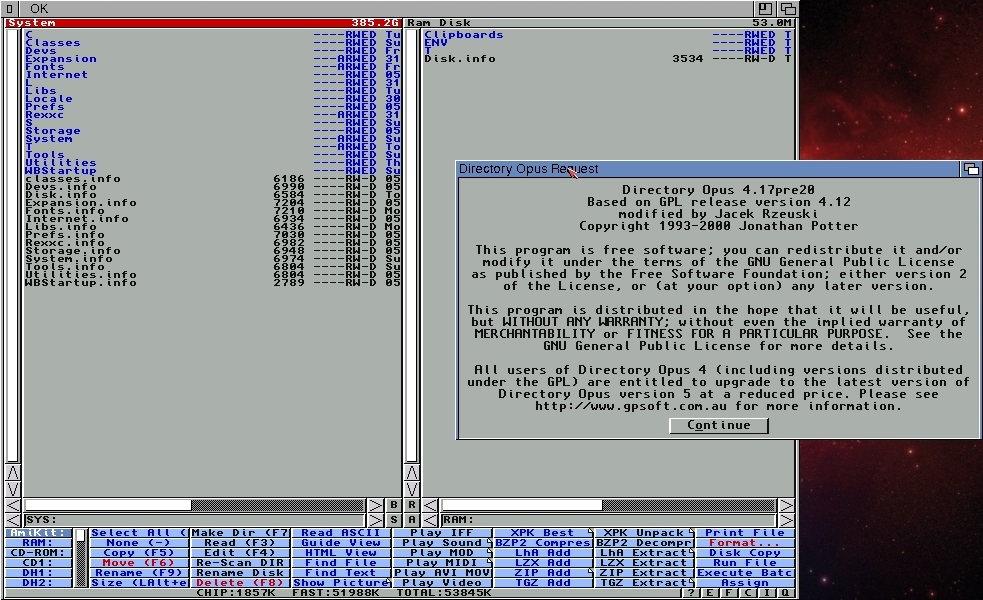
DOpus 4.17 pre 20

6. LhA-RAM
LhA-RAM

7. ScreenMode Prefs
ScreenMode Preferences

8. Input Prefs
Input Preferences

9. NoWinED
NoWinED 0.83

I can now turn on my laptop, E.M.M.A., on and it boots straight into a full screen, 1366x768 Workbench, omitting having to see Windows entirely. Unfortunately the boot time is quite excessive, over 1 minute, even having disabled most of the Windows software that used to start on bootup.

I have added some up to date datatypes and libraries and would like to make it look a lot more like my Sam440ep but I am unable to install the DeJaVu font which I use as my default workbench font and I also use it in my InTune program.

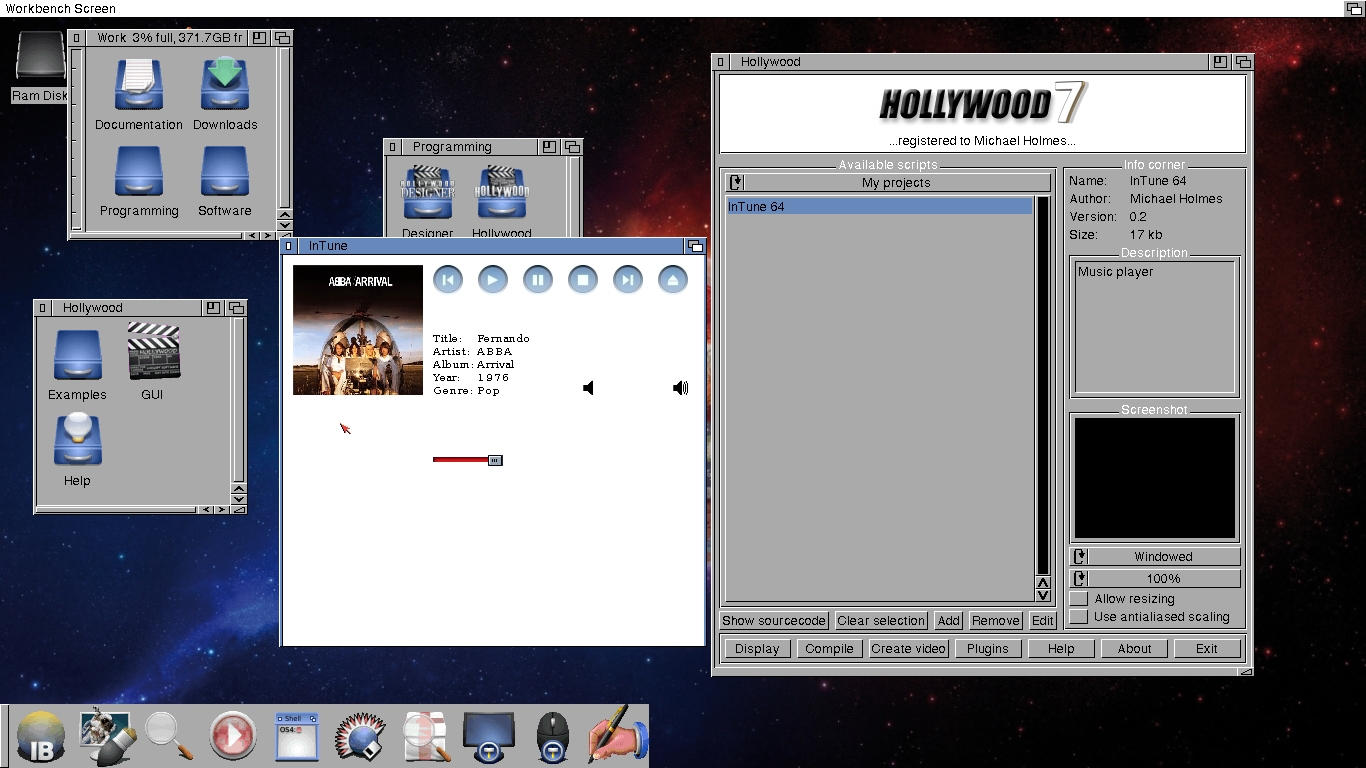
I can open Hollywood v7.0 and work on InTune, my music player, allowing me to get on and enjoy programming the Amiga way. I will hopefully, also, take a fresh look at my Star Trek database. 

Hollywood Running Just Fine

Showing My InTune Program Running

As you can see InTune is nowhere near complete. There's no playlist, not all MP3s load, seems to have some error when reading ID3 tags for artist on some MP3s.

I have to admit no matter how time consuming it is to do all I have done to get this far with E.M.M.A. I have thoroughly enjoyed every minute.

As an adendum I wanted to tell you all that I had intended on starting a new project M.A.R.I.E. (My Amiga Recreation In Emulation), I know a bit corny but still something I wanted to do but never got round to it, but there is always time. Just get all the bits together, a suitable laptop, most upto date Amiga Forever, a copy of AmigaOS4.1fe and any other bits I may need. Watch this space.

Follow and comment below

Michael

Thursday, 25 September 2025

E.M.M.A. (Emulated Machine, My Amiga) Pt4

WHAT I REALISED

OK, so this is part 4 and we are close to the end of E.M.M.A. Keep in mind this was originally done in July od 2017 and a lot of improvements have been made to the emulation software.

Looking back at E.M.M.A. I realised I had raised the bar way too high, running OS4.1 Classic on an emulated PPC machine, for the specification of this laptop and that running Amiga OS3.9 would be a better choice for my needs.

What I Wish
The hope of booting straight into Amiga OS3.9 and being able to work on my Hollywood projects, InTune and Star Trek Database, while on the go.

Installation "Sort Of"
I decided to forgo the installation and setup descriptive process, as this has been written about on numerous occasions and on various website. Epsilon in December of 2015 wrote about the process of installing Amiga Forever 2016 and Guru Meditation has a YouTube video showing How to install OS4.1.

Step 1...
Installation of Amiga Forever 7 completed and when run for the first time we are greeted with the very familiar Amiga Forever Launcher and the first thing I did was create a copy of the Workbench 3.x system and rename it E.M.M.A. and change the date to 2017.

Amiga Forever 7 Launcher

Renaming My Configuration to E.M.M.A.

First E.M.M.A. Emulation Session

I know I will eventually be going full screen but thought, for now, I'd resize the screen to give me as much Workbench real estate without it disappearing behind the PC taskbar at the bottom.

ScreenMode Prefs

Right I now have it figured, If I change screen mode to 1366x768, which is the same resolution as E.M.M.A. and then select fullscreen then Amiga Forever takes up the whole screen.

Resizing With ScreenMode Prefs to 1366x768

Selecting Fullscreen

E.M.M.A. in All Her Glory

I am now very excited at how this is going. There are still many things to do. Need to have it boot into this, full screen Amiga Workbench and of course the look and which software to install, etc.

I'd like to say a huge thank you to M. C. Battilana for allowing me the use of Amiga Forever 7 on my pride and joy.

Let's see how far I can take this project, I'd like it to be known I am not trying to compete with A.L.I.C.E.

Follow and comment below

Michael